
State and County Hotel Taxes

Table of Contents

Documents/Files Needed

The filing of Taxes Forms is done every month. You need to have access to the following:

These sites/sheets will help you get the correct data for proper Tax filing.


Preparing Earning Report

The filing of Request report from Uplisting with dates from 1st up to the last day of the monht
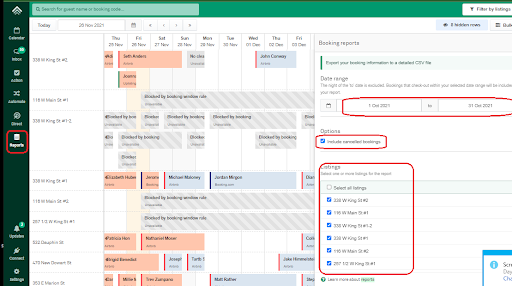
Please note, to tick on “Include Cancelled Bookings”. Also, if you are getting a report for Lancaster county only, tick on all the locations except for Shenandoah. 
  • Get Quickbooks report for the “Monthly Invoice Report by Invoice List” or check the sheets QuickbooksVer and UplistingVer.  Do a compare and contrast of the transactions.  Keep in mind that Uplisting will have the correct number of bookings but Quickbooks has the correct amount.
  • Freeze top row and delete unnecessary columns matching MonthlyDataSummary.
  • Format Checkin and Checkout columns | “xx/xx/xxxx”.
  • Copy PropertiesAllData! E1:G9999 to Q2:S999999 in to Earning Report doc
    • select and copy data 
    • Click Q2 in listing report
    • Home, Paste Formatting or Paste Values
  • Make sure to save in XLSX (Excel Worksheet) format and not CSV.

Check Canceled Listings $ Amount

  • sort by ‘Channel’ A-Z
  • sort by ‘Status’
  • check all non Airbnb reservations
  • sort by ‘Checkin’ newest to oldest
  • sort by ‘Channel’ A-Z
  • sort by ‘Status’ A-Z
  • Go to https://www.airbnb.com/hosting/reservations/canceled
  • sort by ‘Check-out’ (on airbnb) newest to oldest
  • check all Airbnb Reservations

Fill Out Tax Form

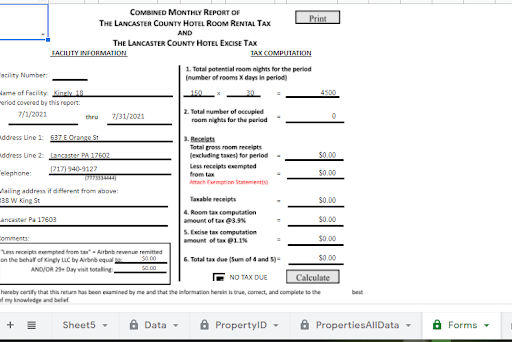
  • Check that data in PropertyID Column E-1 matches Property Name in PropertyID Column D. This is crucial to data in for properties in forms! to populate correctly.
  • Select desired property in cell Forms!A1 (This is hidden for printing purposes).
  • Make sure Forms!B1 is at “0” unless “gross receipts” need to be adjusted (This is hidden for printing purposes)
  • Make sure Forms!A2 is at “0” unless “exempted receipts” need to be adjusted (This is hidden for printing purposes)
  • Choose the beginning of the month and end of month in cell Forms!A8 & Forms!D8
  • Add any 29+ day stays in B1 (This will auto populate in “Less receipts exempt from tax” box
  • Print in PDF and move to next property
  • Send individual forms from Forms! and edit the Uplisting Report to County.

Submit Forms to County - Monthly

Submit the following:

1. Forms! for each property. Make sure the file format is “02-2021_338 W King #1”
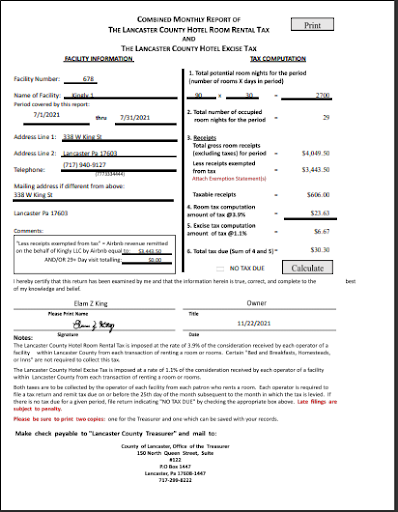
2. MonthlyDataSummary! (1 for each property).
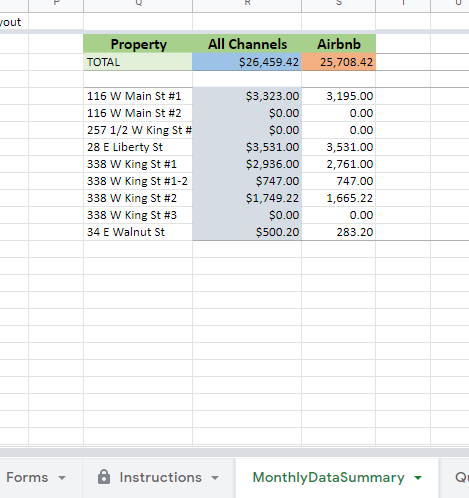
    1. go to PropertiesAllData sheet, change the dates needed
    2. copy the result from columns Property, All Channels and Airbnb

3. If more than 29 days fill out Permanent Residence Form
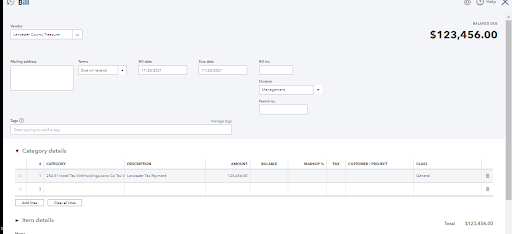
LANCASTER:
Email the above to ‘Angie Platis’ platis@co.lancaster.pa.us AND ‘Janet Keuper’ JaKeuper@co.lancaster.pa.us 
 
Mail cheque to Lancaster County Treasurer
          a.  Create BILL in Quickbooks
          b. Include “[Month] HOTEL TAX Kingly 1-20 and more” in Memo
MONROE: (1543 Lake Lane)
  • Submission QUARTERLY; every 25th.
  • Create bill/check submission via QBO
  • Send email for the tax report to treasurernotify@monroecountypa.gov
 
HUNTINGDON: (8933 Shenandoah)
  • Submission QUARTERLY; every 25th.
  • Create bill/check submission via QBO
  • Send email for the tax report to sharry@huntgdoncounty.net
ADAMS: (2251 Cold Springs)
  • Submission MONTHLY; every 20th.
  • Create bill/check submission via QBO
  • Send email for the tax report to
 
YORK: (5470 Mt Pisgah)
  • Submission QUARTERLY; every 25th.
  • Create bill/check submission via QBO
  • Send email for the tax report to
State Sales Tax PA:
  • Submission QUARTERLY; every 25th.
  • Create bill/check submission via QBO
  • Send email for the tax report to 
State Sales Tax MD:
  • Submission QUARTERLY; every 25th.
  • Create bill/check submission via QBO
  • Send email for the tax report to

Double-check Data in QBO vs Sheet

We need the data we have versus the numbers indicated in Quickbooks.

Here is the video: https://vimeo.com/659768752/26d979f7f7

Submit Forms to State - Quarterly

  1. For deadlines check https://www.revenue.pa.gov/FormsandPublications/FormsforBusinesses/SUT/Documents/2020_rev-819.pdf
  2. Log in to https://www.etides.state.pa.us/Home/Index   
  3. Navigate to ‘File Return / Payment’ https://www.etides.state.pa.us/TaxReturn/FileReturn/SelectTaxSystem
  4. Select tax system ‘Sales, Use, & Hotel Occupancy Tax’
  5. Select ‘Kingly LLC (67-671 466)’ under ‘I would like to: File a Sales, Use and Hotel Occupancy Tax Return or Payment’
  6. Select ‘Sales Tax Return’ and choose correct quarter from drop down menu AND ‘ACH Debit (EFT)’ For payment method
  7. Enter correct numbers (refer to PropertiesAllData! with correct dates) and submit

Training videos on how to enter the State and Sales tax.

https://drive.google.com/drive/folders/1sqRZwQIL850jeUtzF5Hv42n_6lpn2btn?usp=sharing